

Introduction
Section titled “Introduction”The IntelliProve API is organised around REST. Our API has predictable resource-oriented URLs, accepts JSON-encoded request bodies, returns JSON-encoded responses, and uses standard HTTP response codes, authentication, and verbs.
https://engine.intelliprove.comExamples:
POST https://engine.intelliprove.com/v2/users
GET https://engine.intelliprove.com/v2/users
Authentication
Section titled “Authentication”The IntelliProve API supports both API keys and JWT Action Tokens to authenticate HTTP requests.
All API requests must be made over HTTPS. Calls made over plain HTTP will fail.
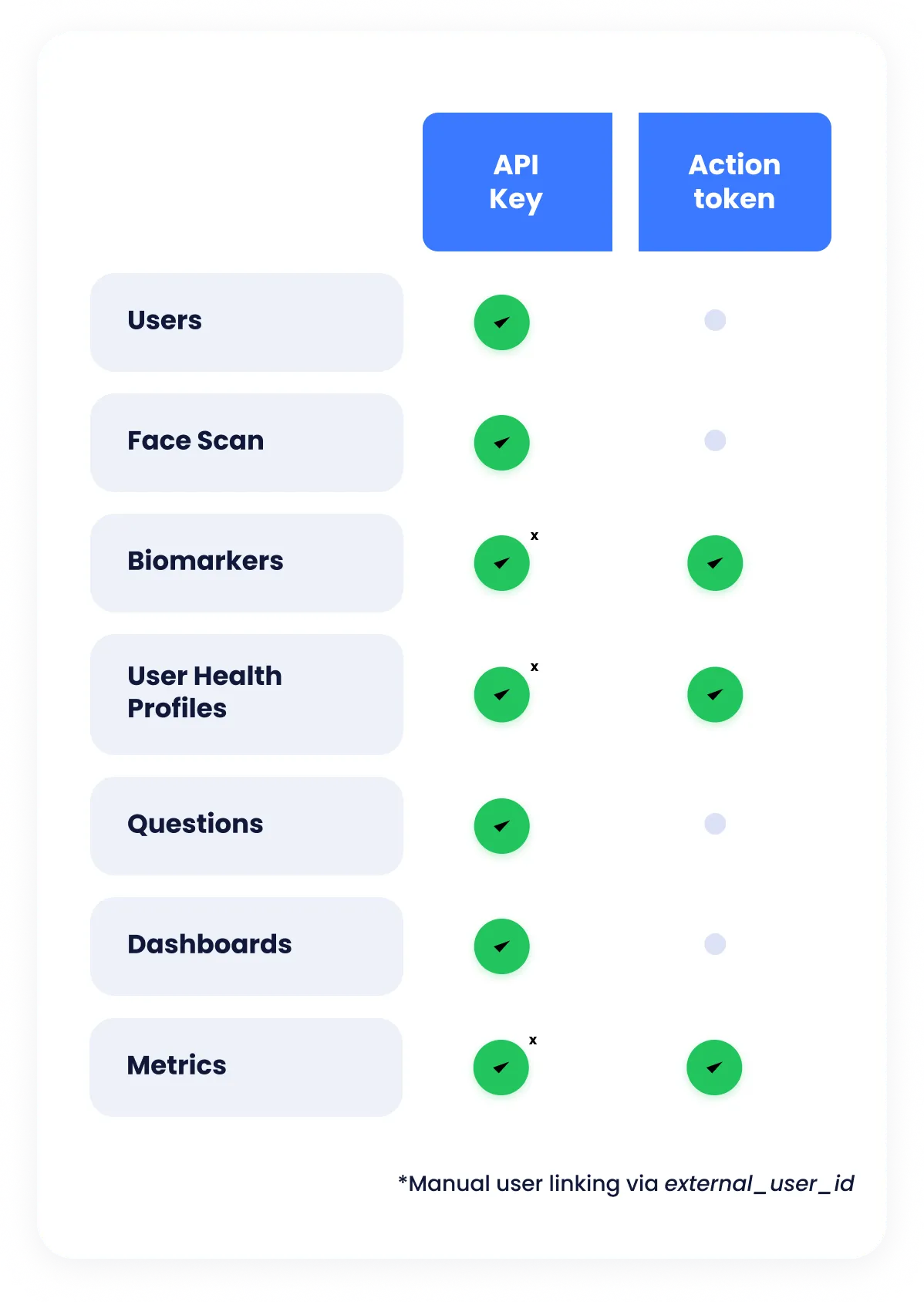
Authentication and permission roles are defined per resource. The API key provides full access, while an action token provides a temporary form of authentication only compatible with a selection of the API endpoints. Refer to the table below for an overview.
API Keys
Section titled “API Keys”API Keys are distributed when you sign up for a plan with IntelliProve. They can’t be created manually.
Upon agreement, you’ll receive at least two API keys. Development API keys, which can be used during development, are aliased with a “-DEV” suffix.
| Alias | API Key (non-working examples) |
|---|---|
| COMPANY_NAME-DEV | KUsWnp2vRGCfW8XPYJZeQdh-eT!n-Ms.UcyaETy3 |
| COMPANY_NAME | fWeBpZ9CKaKb7pnk@vGtkQDjZFQ_U2g@GZu_Z74X |
API keys should be provided using Header-based API Key Authentication:
x-api-key: <your-api-key>User linking when using API keys
Section titled “User linking when using API keys”Some API resources are user-specific, which means they are tied to a User. When accessing these resources with API Key authentication, you must explicitly specify which user the request should apply to. This is done by providing the External User ID in the request.
Specify the external_user_id using a query parameter:
"&external_user_id=<your-external-user-id>"Or, specify external_user_id using a body parameter:
{ "user_external_id": "<your-external-user-id>", ...}Action Tokens
Section titled “Action Tokens”Action tokens can be created using the IntelliProve API with a valid API key. Use the Create user action token endpoint to do this.
Unlike API keys, User Action Tokens are always linked to a User, specified when creating the action token.
Provide the action token in your request using the Header-based Token Authentication:
Authorization: Token <action-token-for-user>When to use
Section titled “When to use”Action tokens are specifically designed to be used in frontend code, as they have restricted access and automatically expire after a predefined timespan. However, they may also be used in backend code for certain usecases.
Action tokens can be used for selected API endpoints — an overview can be found in the table under Authentication.
When using action tokens, always created the token right before a User performs an action in your front-end – hence the name Action Token. This action token can be used while the user is performing the action (for example, consult the results of a Face Scan). If a user leaves a page and does another action, a new action token should be created.
Authentication Summary
Section titled “Authentication Summary”| API key | Action token | |
|---|---|---|
| Scope | Full access to all data. | Limited access to user-specific data. |
| Lifetime and creation | Created when you sign up for a plan. Does not expire. | Created by you using your API key. Expires after a few hours. Recommended to create and use within the scope of a user’s action(s) on a page of your application. |
| Usage | Used for M2M communication. | Used for performing action induced by the frontend. |
| Link to user | Link manually via external_user_id. | Automatically linked, external_user_id should not be passed in the request. |
Localisation
Section titled “Localisation”Languages
Section titled “Languages”Some endpoints support localized content. You can request a specific language by providing the language code in the relevant parameter
| Language | Code |
|---|---|
| Dutch | nl |
| Danish | da |
| English | en |
| French | fr |
| German | de |
| Spanish | es |
| Swedish | sv |
When no language is provided, the default language is used.
Unit systems
Section titled “Unit systems”IntelliProve supports both the metric and imperial unit system for displaying data to users.
All data is stored in the metric system but can be converted to the imperial unit system if desired. The preference can be set for your entire account as a customer, or per user. If no preference is set, all responses default to the metric unit system.
Order of unit system selection
Section titled “Order of unit system selection”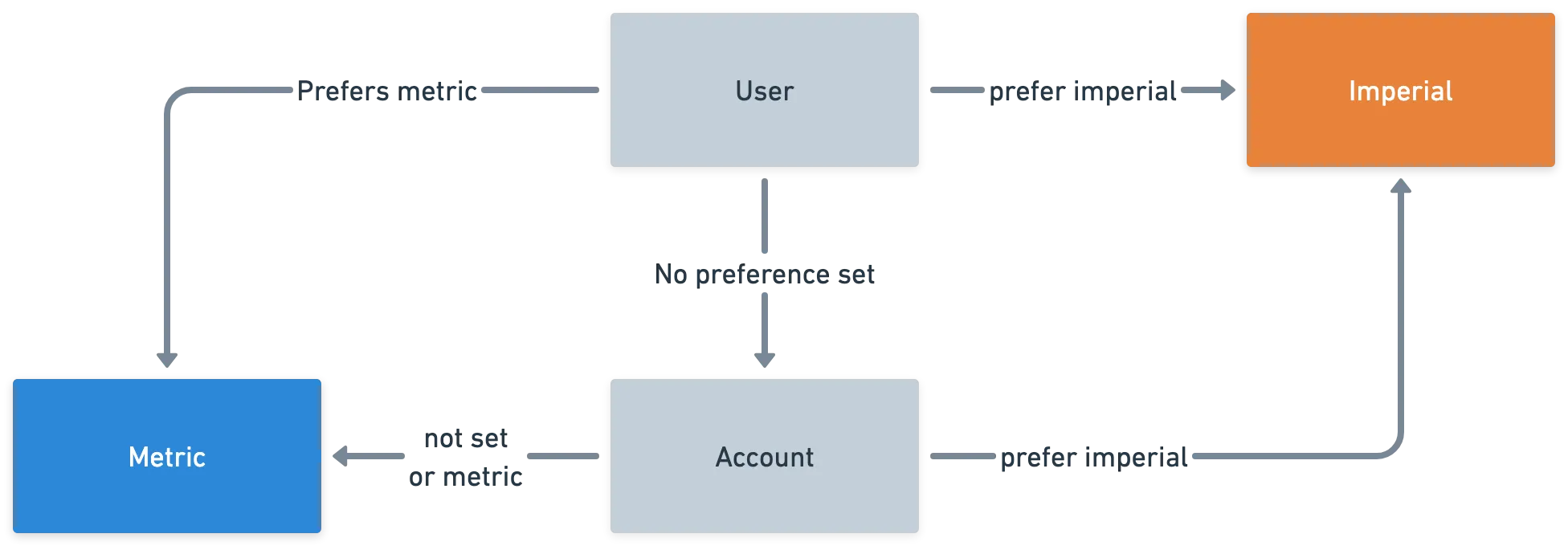
The preferred account-wide unit system setting can be communicated with your Customer Success Manager. A user’s preferred unit system can be set using the Users endpoints.
Errors
Section titled “Errors”In general, Status Codes in the 2xx range indicate success. Codes in the 4xx range indicate an error that failed given the information provided (e.g., a required parameter was omitted or the request format is invalid, etc.). Codes in the 5xx range indicate an error with IntelliProve’s servers.
| Status Code | Description |
|---|---|
| 200 - OK | Everything worked as expected |
| 204 - No Content | The request is correct, but there is no content to be returned |
| 400 - Bad Request | The request was unacceptable |
| 401 - Not Authorized | No valid authentication provided |
| 403 - Forbidden | Invalid permissions to perform the request |
| 404 - Not Found | The request resource or endpoint does not exist |
| 422 - Unprocessable | One or more fields in the request body are invalid |
| 500, 502, 503 - Server Errors | Something went wrong on our end |
The 4xx and 5xx errors can be handled programmatically and include an error description that briefly explains the error reported.
{ "detail": "User not found!"}An exception is made for the 422 errors, which give detailed information on which request parameter failed the validation.
{ "detail": [ { "loc": [ "body", "data" ], "msg": "field required", "type": "value_error.missing" } ]}The User Object
A User is a unique end-user accessing IntelliProve’s services through your platform or app. Each User must be created once, enabling IntelliProve to track their Face Scans and build a personalized Health Profile.
When creating a user, you choose your own external_user_id (referred to as “External User ID”). Make sure it is an URL-encoded value.
Once created, you can reference Users by their external_user_id.
| User object properties | Description |
|---|---|
user_iduuid | Unique, IntelliProve internal User ID, assigned to each end user. |
external_user_idnullable string | The unique ID you choose when creating an IntelliProve User. Stored in your own backend and used when requesting user data. Referred to as External User ID in the documentation. |
customerread-only string | Your company’s name, which the end user is linked to. |
birth_datenullable date object | Date of birth in YYYY-MM-dd format |
sexnullable string enum | Sex at birth Values: “M”, “F” |
languagenullable string enum | Two-letter language code Values: “en”, “nl”, “fr”, “da”, “sv” |
preferred_unit_systemnullable string enum | The preferred unit system for this user. Values: “metric”, “imperial” |
Create new User
POSThttps://engine.intelliprove.com/v2/users
Create a new user with the provided user details.
Header parameters
x-api-keystring | required | Your API key |
Body parameters
external_user_idstring | required | External User ID, chosen when creating the user |
birth_datestring | optional | User birth date in YYYY-MM-dd notation |
sexstring | optional | Sex at birth value (M or F) |
languagestring | optional | Two-letter language code for preferred user language (default: en) |
preferred_unit_systemstring | optional | The preferred unit system for this user. "metric" or "imperial" |
Get User Details
GEThttps://engine.intelliprove.com/v2/users
Get user details by user ID or external user ID.
Query parameters
external_user_idstring | required | External User ID, chosen when creating the user |
Header parameters
x-api-keystring | required | Your API key |
Response
{ "user_id": "df55e9ab-77b9-4b32-bd83-d76de23f6f3d", "customer": "<customer-name>", "birth_date": "1964-01-12", "sex": "M", "weight": { "value": 91, "unit": "kg" }, "height": { "value": 183, "unit": "cm" }, "hypertension": 1, "language": "en", "preferred_unit_system": "metric"}{ "detail": "Missing or invalid authentication credentials."}Update existing User
PUThttps://engine.intelliprove.com/v2/users/:user_id
Update a User's information. All fields that are not provided in the body will be left unchanged.
Path parameters
user_idstring | required | IntelliProve internal User ID. Obtain via 'Get User Details' endpoint. |
Header parameters
x-api-keystring | required | Your API key |
Body parameters
external_user_idstring | optional | New external User ID |
birth_datestring | optional | User birth date in YYYY-MM-dd notation |
sexstring | optional | Sex at birth value (M or F) |
languagestring | optional | Two-letter language code for preferred user language (default: en) |
Create user action token
POSThttps://engine.intelliprove.com/v2/users/authenticate
Create a new action token for a user based on the external user ID.
Header parameters
x-api-keystring | required | Your API key |
Body parameters
external_user_idstring | required | External User ID, chosen when creating the user |
Delete user
DELETEhttps://engine.intelliprove.com/v2/users/
Delete all user data, including user profiles and face scan results, based on the user ID.
Query parameters
user_idstring | required | IntelliProve internal User ID. Obtain via 'Get User Details' endpoint. |
Header parameters
x-api-keystring | required | Your API key |
Response
{ "detail": "Missing or invalid authentication credentials."}Face Scan
Section titled “Face Scan”To request a Face Scan URL, the user performing the scan must be created with IntelliProve. This only needs to be done once for each user and can be done with the Create New User API endpoint. To create the user, you must provide a unique reference for the user as a query parameter: external_user_id.
Get Face Scan URL
GEThttps://engine.intelliprove.com/v2/userjourneys/scan
Get the Face Scan URL for a specific user based on the user ID or external user reference.
Query parameters
external_user_idstring | required | External User ID, chosen when creating the user |
languagestring | optional | Two-letter language code for overriding user-level preferred language |
Header parameters
x-api-keystring | required | Your API key |
Biomarkers
Section titled “Biomarkers”Get Face Scan Biomarkers
GEThttps://engine.intelliprove.com/v2/face_scans/:face_scan_id
Get Biomarkers for a specific Face Scan, using the Face Scan ID.
Path parameters
face_scan_idString | required | Face Scan UUID |
Query parameters
external_user_idstring | required | External User ID, chosen when creating the user |
Header parameters
x-api-keystring | required | Your API key |
Response
{ "face_scan_id": "ea23e5cd-22c8-1e54-bd82-e89de12a7e1b" "heart_rate": 56, "respiratory_rate": 12, "heart_rate_variability": 123, "resonant_breathing_score": 18, "systolic_blood_pressure": 128, "diastolic_blood_pressure": 77, "timestamp_epoch": 1742919213, "timestamp": "2025-03-25T17:13:33.147258+01:00"}Get multiple Face Scan Biomarkers
GEThttps://engine.intelliprove.com/v2/face_scans/
Get the Biomarkers from multiple Face Scans of a user by specifying start date, end date and count. The user is specified through the action token.
Query parameters
startstring | optional | Start date, all returned face scans will be after this date time. ISO Format |
endstring | optional | End date, all returned face scans will be before this date time. ISO Format |
orderstring | optional | Order of the returned face scans: 'asc' or 'desc'. Default: 'asc' |
countstring | optional | Max number of face scans to return. Defaults to 10. |
external_user_idstring | optional | External User ID, chosen when creating the user |
Header parameters
x-api-keystring | required | Your API key |
Response
[ { "face_scan_id": "ea23e5cd-22c8-1e54-bd82-e89de12a7e1b" "heart_rate": 65, "respiratory_rate": 12, "heart_rate_variability": 123, "resonant_breathing_score": 18, "systolic_blood_pressure": 128, "diastolic_blood_pressure": 77, "timestamp_epoch": 1742919213, "timestamp": "2025-03-25T17:13:33.147258+01:00" }, ...]Get Latest Face Scan Biomarkers
GEThttps://engine.intelliprove.com/v2/face_scans/latest
Get the Biomarkers from the latest Face Scan(s) of a user. The user is specified through the action token. The count can be specified to request more than one Face Scan.
Query parameters
countstring | optional | Last x number of measurements. Default = 1 |
external_user_idstring | required | External User ID, chosen when creating the user |
Header parameters
x-api-keystring | required | Your API key |
Response
[ { "face_scan_id": "ea23e5cd-22c8-1e54-bd82-e89de12a7e1b" "heart_rate": 65, "respiratory_rate": 12, "heart_rate_variability": 123, "resonant_breathing_score": 18, "systolic_blood_pressure": 128, "diastolic_blood_pressure": 77, "timestamp_epoch": 1742919213, "timestamp": "2025-03-25T17:13:33.147258+01:00" }, ...]Metrics
Section titled “Metrics”Use this endpoint to get Health Metric data for users.
Get Health metrics
GEThttps://engine.intelliprove.com/v2/metrics
Get the metrics for a single user.
Query parameters
external_user_idstring | required | External User ID, chosen when creating the user |
Header parameters
x-api-keystring | required | Your API key |
Response
{ "metrics": { "energy_balance": { "score": 82.13, "confidence": 80.0 }, "general_fitness": { "score": 71.08, "confidence": 60.0 }, "hypertension": { "score": 92.0, "confidence": 33.33 }, "mental_health_risk": { "score": 49.85, "confidence": 66.67 }, "mental_stress": { "score": 86.56, "confidence": 70.0 }, "sleep_quality": null }, "last_update": "2025-10-13T14:49:02.111245+02:00"}{ "detail": "Invalid UUID provided!"}Wellbeing topics
Section titled “Wellbeing topics”Get scores related to the different wellbeing topics.
Get wellbeing scores
GEThttps://engine.intelliprove.com/v2/userprofiles/wellbeing
Get all the wellbeing scores for a user. A score is a value between 0-100, representing a percentage, per topic. The user is specified through the action token.
Query parameters
external_user_idstring | required | External User ID, chosen when creating the user |
Header parameters
x-api-keystring | required | Your API key |
Response
{ "mental": <mental-score>, // e.g. 82 "physical": <physical-score>, // e.g. 82 "energy_sleep": <energy-sleep-score>, // e.g. 82 "status_label": <label> // e.g. "GGG"}Questions
Section titled “Questions”The following endpoints are related to questions regarding user details such as age, weight or sex. These are used build an accurate baseline profile for each user and are essential for the calculation of metrics. Questions during the Face Scan allow the user to directly provide this information. However, if you already have this information, you can provide it to us via the API. The question will then not be asked in the Face Scan flow anymore.
Refer to the Plug-in components documentation for more information.
Get all question lookup keys
GEThttps://engine.intelliprove.com/v2/questions/all
Get a list of all supported question lookup keys.
Header parameters
x-api-keystring | required | Your API key |
Response
[ "height", "weight", "balance_coordination", "hours_sport_week", "daily_activities", "nightly_wake_ups", "feeling_stressed_last_month", "struggling_irritations_last_month", "things_your_way_last_month", "average_sleep_hours", ...]Get all answered questions
GEThttps://engine.intelliprove.com/v2/questions/answered
Get a list of all the questions a user has answered.
Query parameters
external_user_idstring | optional | External User ID, chosen when creating the user |
Header parameters
x-api-keystring | required | Your API key |
Response
{ "items": [ { "question_lookup_key": "things_your_way_last_month", "answer": 4, "score": 40, "health_scan_id": "f8a706bf-022a-...", "local_timestamp": "1970-01-01T10:00:00.000000+02:00" }, { "question_lookup_key": "parental_hypertension", "answer": 1, "score": null, "health_scan_id": "f8a706bf-022a-...", "local_timestamp": "1970-01-01T10:00:00.000000+02:00" }, { "question_lookup_key": "smoking", "answer": 1, "score": 95, "health_scan_id": "f8a706bf-022a-...", "local_timestamp": "1970-01-01T10:00:00.000000+02:00" }, ... ], "pagination": { "page": 1, "page_size": 10, "total_pages": 1, "total_items": 20, "next_page": null }}Save question answer
POSThttps://engine.intelliprove.com/v2/questions/answer
Save an answer to a question for one of your users
Query parameters
external_user_idstring | optional | External User ID, chosen when creating the user |
Header parameters
x-api-keystring | required | Your API key |
Request
{ "value": 24, "lookup_key": "age", "timezone": "Europe/Brussels"}Response
{ "lookup_key": "age", "value": 24, "user_id": "df55e9ab-77b9-4b32-bd83-d76de23f6f3d"}Save multiple question answers
POSThttps://engine.intelliprove.com/v2/questions/answer/many
Save an answer to a question for one of your users
Query parameters
external_user_idstring | optional | External User ID, chosen when creating the user |
Header parameters
x-api-keystring | optional | Your API key |
Request
[ { "value": 24, "lookup_key": "age", "timezone": "Europe/Brussels" }, ...]Response
[ { "lookup_key": "age", "value": 24, "user_id": "df55e9ab-77b9-4b32-bd83-d76de23f6f3d" }, ...]Dashboards
Section titled “Dashboards”These API endpoints provide easy ways to generate URLs to personalised user dashboards. Each generated URL includes a temporary, user-specific access token that grants limited-time access to the dashboard.
Get Health dashboard URL
POSThttps://engine.intelliprove.com/v2/dashboards/health
Request a one-time URL for the users personal health dashboard by user ID or external user ID.
Header parameters
x-api-keystring | required | Your API key |
Body parameters
external_user_idstring | required | External User ID, chosen when creating the user |
languagestring | optional | Two-letter language code override. Default: user language |
disabled_sectionsarray | optional | Add section ('main', 'metrics', 'biomarkers' or 'recommendations') to list to disable it. Default: Empty list. |
Request
{ "external_user_id": "user.email@example.com", "language": "en", "disabled_sections": [ "recommendations", "todos", "biomarkers", "metrics"] # pick what you want to disable}Response
"https://dashboard.intelliprove.com?action_token=<generated-action-token>&language=en"Recommendations
Section titled “Recommendations”These API endpoints allow you to get and manage your recommendations for your users.
Get recommendations for user
GEThttps://engine.intelliprove.com/v2/recommendations
Get a list of your recommendations filtered for the specified user based on their IntelliProve profile and health scans. This endpoint can be called with both API keys or using an action token.
Query parameters
external_user_idstring | required | External User ID, chosen when creating the user |
languagestring | optional | Two-letter language code override. Default: user language |
Header parameters
x-api-keystring | required | Your API key |
Response
{ "recommendations": [ { "title": "Get energized with partner", "description": "A descriptive text about your recommendation", "action_url": "https://engine.intelliprove.com/v2/tracking/Cnf0xxxxxxxxxxxx", "action_text": "Take me there", "image_url": "https://cdn.intelliprove.com/customers/my-customer/recommendations/some-image-name.jpg", "related_metric": "energy_balance", "relevance": 1, "lookup_key": "energy_balance_1" }, ... ]}The relevanceproperty is a number starting from 1. Relevance 1 is most relevant, 2 second, etc.